Emergency Alerts
Sign up to receive emergency alerts. This is the best way to get the information you need for weather advisories and other events.
Cascadia College update on Canvas security incident
Information for our students, faculty, staff, and community about a security incident involving the Canvas learning management system.
Posted May 8, 2026, 4:24 PM
Cascadia College is sharing an update on a security incident involving Canvas, the learning management system used at our college and at colleges across the country.
What happened:
On Thursday, May 7, 2026, Instructure — the company that operates Canvas — notified Cascadia College that an unauthorized third party obtained data associated with our Canvas environment. This incident was not specifically directed at Cascadia College. Instructure serves many institutions, and this appears to be a vendor-driven incident affecting multiple education customers. Instructure has stated that the broader incident affected many institutions in the United States. Instructure has reported that the attack occurred on April 25, 2026; that the company detected the attacker on April 29; and that access was revoked and the underlying vulnerability was addressed on April 30. Federal law enforcement, including the FBI and the U.S. Cybersecurity and Infrastructure Security Agency (CISA), has been notified by Instructure.
What was involved at our college: Based on the information Instructure has provided to us so far, the data involved may include personal information; however, Instructure has not yet provided the exact data elements or affected user count for our college. Instructure has stated publicly that, across the broader incident, names, email addresses, student ID numbers, and user-to-user Canvas messages were potentially involved. We have asked Instructure to confirm specifically what was involved, including whether Canvas messages were affected and how many users were impacted, and we will share additional information as we receive it.
What was reportedly not involved: Instructure has stated that there is no indication that passwords, dates of birth, Social Security numbers, or financial account information were involved. If Instructure’s findings change, we will update affected community members.
** Status of Canvas:
Canvas is operating normally and our students, faculty, and staff can continue using it for coursework. There is no specific action our community needs to take at this time. We are not asking users to reset passwords or take security steps inside Canvas.
What we are doing:
Cascadia College is working with the State Board for Community and Technical Colleges (SBCTC), to press Instructure for additional information about what was specifically involved at our college. We will provide further updates on this page as additional confirmed information becomes available.
Information for our community:
Anyone with questions can contact Laura Hedal, Senior Director, Information Technology Services at 425.352.8181 or lhedal@cascadia.edu. Out of an abundance of caution, members of our community are encouraged to be alert to phishing attempts or unexpected messages requesting personal information.
UWB-CC Safe
UWB-CC Safe is the official safety app for UW Bothell and Cascadia College. The app provides quick access to campus safety information, emergency contacts, safety resources, reporting tools, and important safety notifications to help you stay informed and prepared.
Download
UW Bothell and Cascadia College community members can sign in using their UW NetID or Cascadia credentials, and guests can access available public safety resources.
How to Sign Up for Alerts
This is where safety begins. Cascadia and UW Bothell use an alert system to keep you informed in the event of a campus closure, warning, or active crisis. You will not be automatically registered. You must sign up.
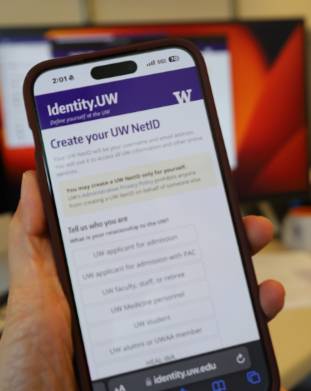
Get a UW NetID
If you already have one, proceed to step two. If you do not have a UW NetID you can create one. All Cascadia students and staff are eligible.
- Get UW NetID
- Select Don’t have a UWNetID yet/Get a personal NetID
- Select I don’t have a UW NetID/I’m not sure
- Follow remaining directions
Log-in with UW NetID
- Go to UW alert web page
- Select the sign up button
- Enter your UW NetID and password and you will be connected to the e2campus portal
Create Your Account
- Fill in name, phone number, select carrier, enter email if desired and agree to terms
- Select “Group: “UW Alert Bothell/Cascadia” (option 2)
- Select box to agree to terms
- Do not close screen yet - the system will send a validation code to your phone and/or validation request to your email
- Enter the phone validation code in box on screen and click “validate”
- If you provided an email address, open email and click “validate” button. The email will be sent from e2Campus and may be forwarded to your Clutter inbox.To update phone or email information or to stop receiving alerts go to UW account management web page
- Subscription is active for one years. Please renew annually.
Communication Platforms
In the event of an emergency or college closure, Cascadia will issue communications using the following platforms:
- UW alert system
- Cascadia Facebook
- Cascadia Instagram
- Cascadia email
- Home page of Cascadia public website
- Major TV and Radio new stations
FAQs
- Emergencies are considered any event that poses a safety risk to the campus community. For example, the most common uses of the alert will be to communicate when the college is closed due to power outages or inclement weather. Other types of emergencies may include unexpected occurrences such as earthquakes or any unexpected event that poses danger or puts your safety at risk.
- No, never. We respect your privacy and you will never receive anything except for official UW Bothell/Cascadia emergency communications.
- Neither Cascadia nor UW Bothell will charge you. However, you are responsible for paying any messaging charges that might be associated with your wireless carrier plan.
- Yes, it is a good practice to re-enroll every year.